Getting Started
| Site: | TCOnline |
| Course: | Online Exemplar 2 |
| Book: | Getting Started |
| Printed by: | Guest user |
| Date: | Thursday, 16 April 2026, 3:01 PM |
Description
This booklet includes information that will help you get this course started on the right foot! It includes general information about how to be successful in this course.
P.S. Other course material will be hidden until you read each page of this book!
Where to Start
To begin this course, please complete the following steps:
- Read every page of the Getting Started book.
- Read every page of the Syllabus.
- Review the links in the Support and Policies drop down menu (located at the top of the page).
- Review the Course Schedule so that you know when assignments and activities are due.
- Post an introduction message to the Introductions Forum found in Unit 1.
- Read the overview for unit 1.
- Read/view the required resources for the first unit of the course.
- Complete the activities/assignments/forum posts for the first unit.
- Repeat steps 6-8 for every unit according to the course schedule.
If you have any course-specific questions, please ask them in the Coffee Shop Forum. For any other questions, contact your professor.
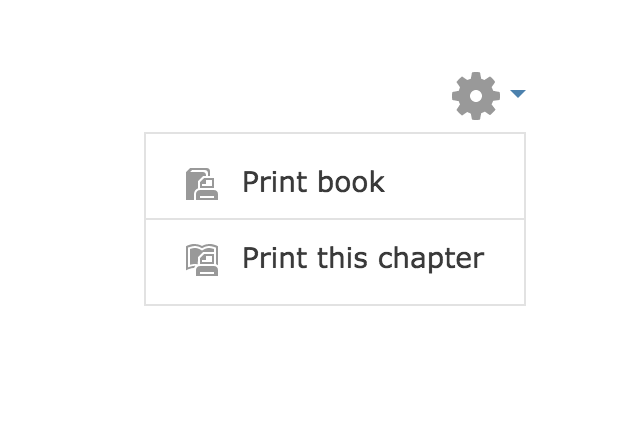
You can print this Getting Started book by going to the Settings block and selecting Print Book.
You must view each page of the Getting Started book in order to move on to the next activity. Use the arrow to move to the next page.
Introduction to Moodle
Moodle is a learning management system of Texarkana College and the location where you will be able to view the content of your online courses. To learn more about Moodle and how it is used, please review the video below:
Course Tour
Course Structure
This course is broken into units. The units open on Monday and end on the following Sunday. Every unit is broken into three sections: Overview, Resources, and Activities.
Overview
Each week includes an overview page that must be read before reviewing the resources and completing the assigned activities. The overview will include an introduction to the week's topics, a list of the week's learning objectives, a list of required and supplemental resources, and detailed instructions for any activities and assignments.
Resources
Resources will be listed under Required and Supplemental subheadings. Reviewing required resources is mandatory. Supplemental resources are suggested if you want to get additional information about a topic. Resources may include links to online articles, text listing offline reading assignments, PDFs, PowerPoints, videos, interactive presentations, or additional file types.
Activities
Activities are required unless they are specifically marked as optional. Activities may include written assignments, video assignments, forums, quizzes, exams, presentations, or other participatory activities.
Grades and attendance will be located in myTC.
There will be no grade book or attendance information view-able in Moodle.
Course Needs
During this course, you will need to make sure that your computer has the following software.
- Microsoft Office is available to the students for free. The installation instructions can be found under the Links section of the Student tab in myTC – Free Office 365 for Students! This is NOT required but could be useful to you. CLICK HERE for information about downloading this program. Note: this program is designed for laptops and pcs not for mobile devices.
- Make sure you have access to a personal computer!
- You will need a webcam. Most laptops come equipped with a webcam, but you can also find them at Walmart for about $20.
- Your computer will also need a microphone. Again, most computers are equipped with this and all webcams should be equipped with a microphone.
CLICK HERE for directions to put your email on your iOs device (iPhone, iPad).
CLICK HERE for directions to put your email on your Andriod device.
Online Course Communication
All course communication (via e-mail, IM, discussion forums, video chat, etc.) should be clear, concise, and respectful. Written communication should use complete sentences with standard spelling and grammar, including proper capitalization and punctuation.
If you have any questions or concerns during the course, please know that I want to see you succeed. The preferred method for sharing your concerns and questions is to email me at______________________. I will communicate any important information with you through your TC email. Please check this email regularly.
Questions about the course should be posted to the Coffee Shop Forum. Questions of a more personal nature, such as grades or extensions, should be sent to your instructor via e-mail. E-mails to your instructor or e-mails to another department regarding support issues should include your course number and section.
All course announcements will be posted by the instructor to the Professor's Corner Forum. Students are expected to check the The Professor's Corner Forum on a daily basis. Any questions about Professor's Corner announcements should be asked in the Coffee Shop Forum.
Online Course Handbook
The Online Course Handbook will provide students with tools to use in order to be successful in online courses at Texarkana College.
The handbook will also be used as a guideline for rules and procedures to be followed in an online environment by both faculty and students.
Click HERE to access the Online Course Handbook.
Support
Please view the Support drop down menu on the top of the course page for information on how to contact support.
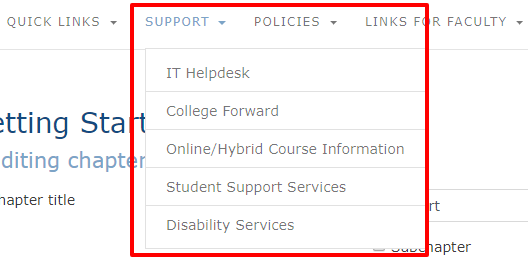
Support information is also available on myTC.
For issues within your course, please contact your instructor via the Coffee Shop Forum or through email.
Online Bookstore
Books can be purchased from the Online Bookstore. If you have any issues with the Online Bookstore please contact the bookstore at 903-823-3020.
Book for this course:
Covey, Sean (2014). The 7 Habits of Highly Effective College Students. USA: FranklinCovey